How to Make a Custom Coloring Page From a Photo
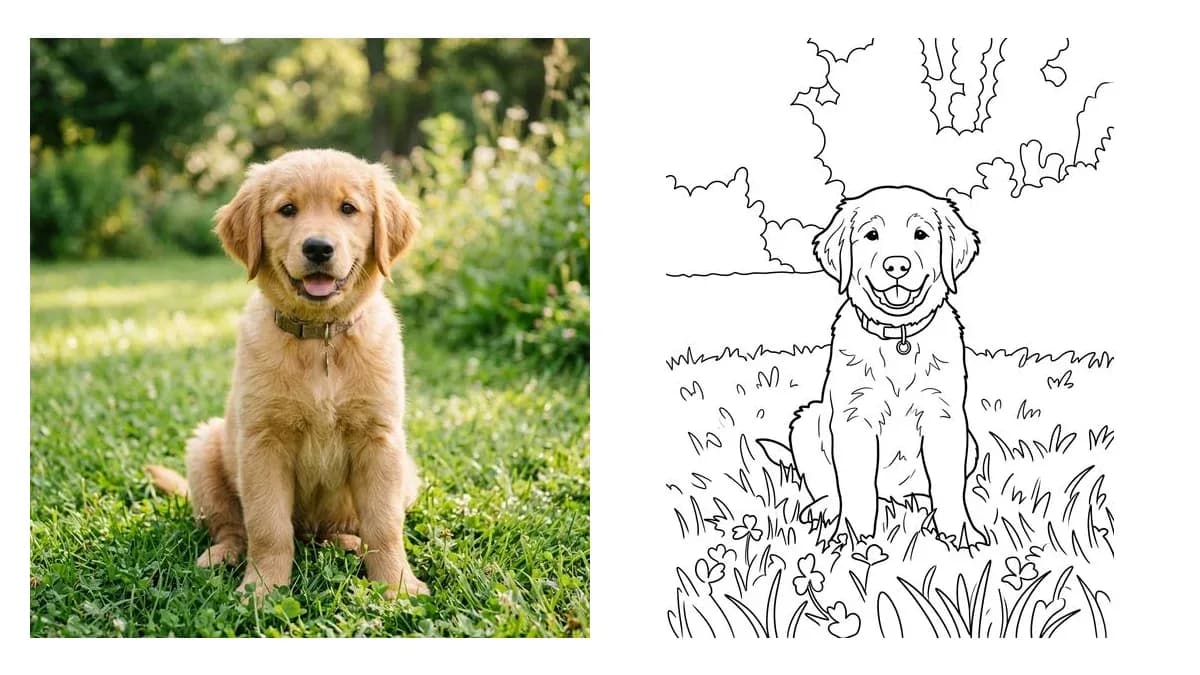
A custom coloring page from a photo takes about a minute. The tool finds the edges in your picture and turns them into clean black lines on a white background. What is left is a page your child can color in.
Here is how to do it:
- Pick a clear photo. Good light matters most. A photo taken near a window beats a dark photo taken indoors at night.
- Upload it. Drag the file into the tool or take a picture with your phone camera.
- Choose your line thickness. Pick Thick for young kids, Medium for school age kids, or Thin for adults who like detail.
- Press Make My Coloring Page and download it. Save it as a PNG or a PDF, or print it right away.
Here is a real example. Say you have a photo of your golden retriever, Max, sitting on the grass at the park. Upload it, choose Thick lines, and you get a bold outline of Max with simple shapes for the fur, the grass and the sky. A 5 year old can color that without getting lost in tiny details.
This works well as a custom coloring page app on your phone too. Open the page in your browser, take a photo, and get your page without installing anything.
Try it now with your own photo.